


Graphical images that clearly demonstrate the ratio of any quantities are often used in economics and finance. But often diagrams can also be seen in technical documentation. In this article, we will try to understand diagrams using examples of the operation of control and management relays.
Time relay – working on schedule
Let's refer to the documentation for the ORT-2T-AC230V time relay. In it, we can find the electrical diagram of the relay and one of the possible connection diagrams (respectively):

Electrical diagram of the IEK time relay (left) and possible connection diagram (right).
This time relay is designed for step-by-step switching of powerful loads and has 2 independent settings/tripping time settings (t1 and t2). Here is what it looks like:

The relay has two groups of changeover contacts, supply voltage (Un) must be applied to contacts A1 and A2. When powering the relay with DC, polarity matters (according to the diagram, plus must be applied to contacts A1 and S).
Let's look at the functional diagram:
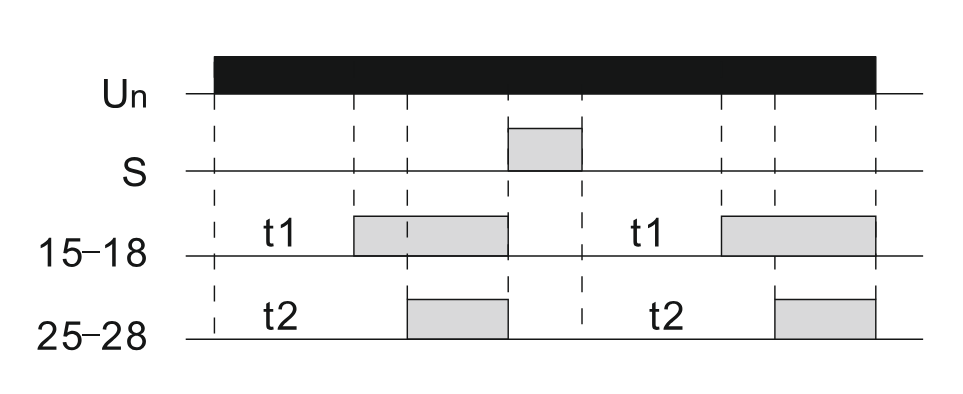
Inputs/outputs of the relay that change their state are located along the Y axis. Time is along the X axis.
A filled rectangle shows that the corresponding input/output is active (there is a signal or the contact is closed).
So, this time relay works as follows: when power is applied to the relay (Un), the countdown of time t1 and t2 begins (the required values can be set by rotary regulators located on the relay front). After time t1 has elapsed, relay contacts 15-18 close, and after time t2 has elapsed, relay contacts 25-28 close.
If power Un is removed from the relay or a signal is applied to contact S, then contacts 15-18 and 25-28 will immediately (without time delay) open. When power Un appears and there is no signal S, the countdown of time t1 and t2 will start again, after which contacts 15-18 and 25-28 will close again. Thus, from the diagram, you can understand how the relay works, how it will react to certain events (input signals).
Phase monitoring relay – monitoring power grid parameters
Now to the documentation for the ORF-06D-220-460VAC phase monitoring relay. In it, we can find the electrical diagram of the relay and one of the possible connection diagrams (respectively):
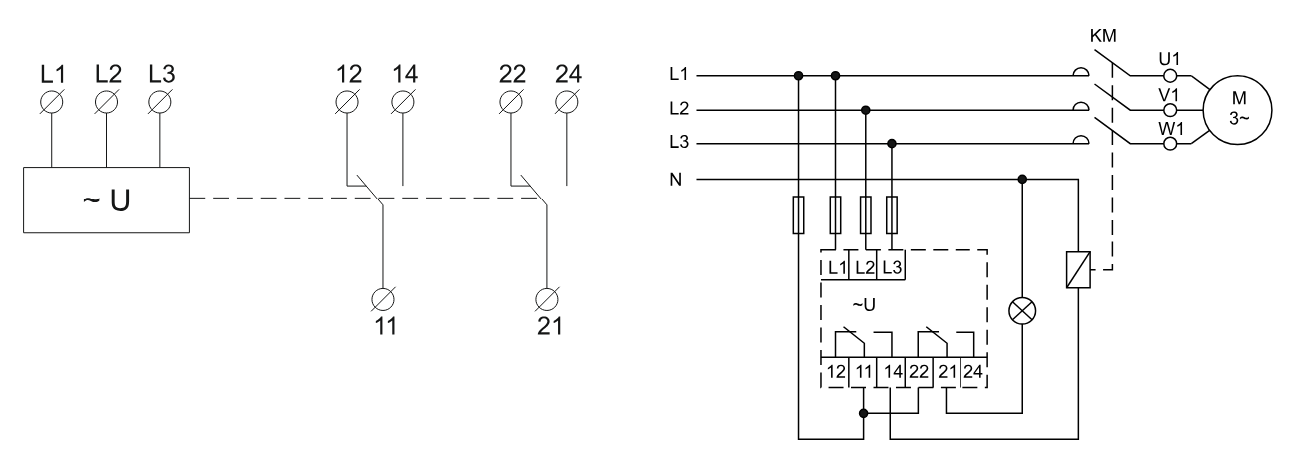
Electrical diagram of the ONI phase monitoring relay (left) and possible connection diagram (right).
This relay is designed to monitor electrical network parameters (phase sequence, phase loss, asymmetry, overvoltage and undervoltage). The device also protects consumers sensitive to these parameters by transmitting a command to actuating devices. The relay itself looks like this:
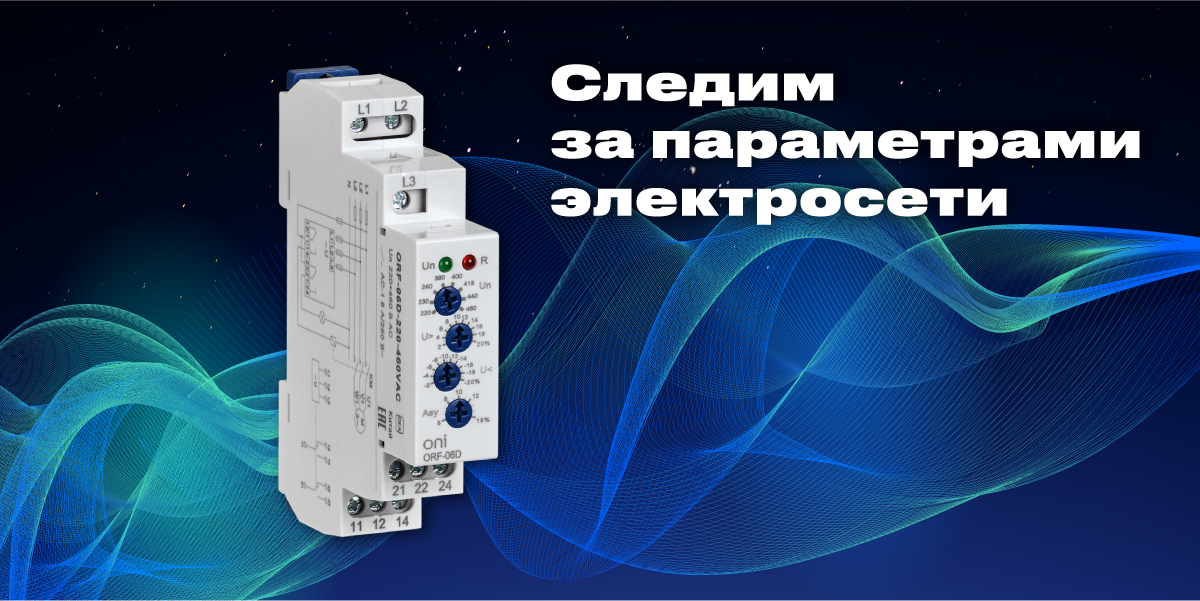
From all this, we understand that the relay has two groups of changeover contacts, supply voltage (Un) must be applied to contacts L1, L2, L3.
Let's look at the functional diagram:
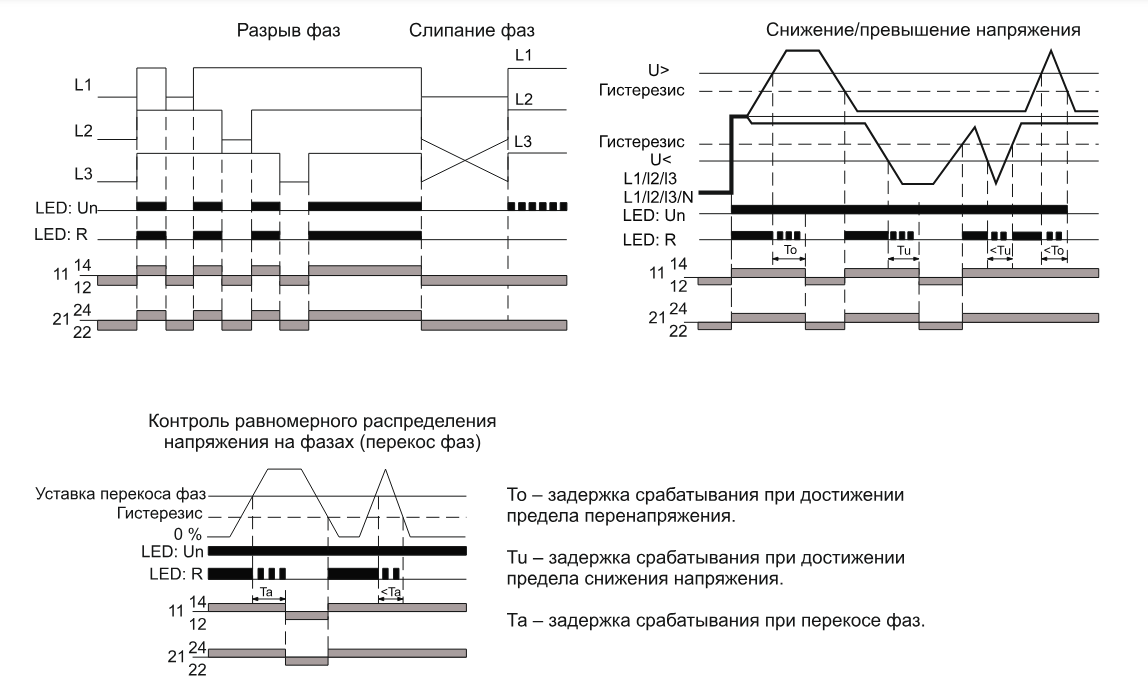
This time relay works as follows:
When normal voltage is applied to L1, L2, L3 (voltage is not over or under, phase sequence is not violated, voltage on each phase is equal), the green Un LED lights up, contacts 11-12 and 21-22 open, and 11-14 and 21-24 close, while the red R LED lights up.
When voltage on L1 is lost, the Un and R LEDs immediately (without time delay) stop lighting, also contacts 11-14 and 21-24 open (and contacts 11-12 and 21-22 close, since the contacts are changeover). The same happens when L2 and L3 are lost/break. When voltage is restored, the relay state is also restored (contacts 11-14 and 21-24 are closed, Un and R LEDs are lit).
When phases stick together or their sequence is violated, contacts 11-14 and 21-24 open, the R LED stops lighting, and the Un LED starts blinking.
When voltage drops/exceeds, contacts 11-14 and 21-24 do not open immediately, but with a time delay. The R LED blinks during the protection tripping delay countdown (opening of 11-14 and 21-24), the Un LED continues to light. When voltage is restored, the relay state is also restored (contacts 11-14 and 21-24 are closed, Un and R LEDs are lit).
Relay restoration to normal operation occurs at a voltage equal to the setting value >U minus hysteresis (according to the documentation for this relay, the hysteresis value is 2% of Un). It is also necessary to take into account that a voltage drop below 0.5Un is perceived by the relay as a phase loss, accordingly, protection tripping (opening of contacts 11-14 and 21-24) will occur without time delay.
A similar algorithm works for the relay when monitoring phase unbalance.