


In the previous article, we told you about our FORS series of wiring accessories, designed for rooms with high humidity and dustiness. But no socket or switch can work well and for a long time if installation rules are not followed.
In this article, we will look at how to properly and with minimal costs install sockets and switches of the FORS series.
How to install FORS series sockets and switches?
FORS wiring accessories are suitable for installation on any wall cladding. The convenient design allows installing a socket or switch in a few simple steps:
1. Lift the protective cover of the socket (or remove the key if it's a switch) and unscrew the screws.
2. Remove the upper part of the housing and take out the mechanism.
3. Switches and sockets have two holes for slotted mounting on the base. Secure the housing base to the surface through these holes.
4. To connect the socket/switch, use a cable with a round cross-section. Ensure cable entry via a cable duct or corrugated pipe to the fixed product.
5. Carefully cut off part of the stepped cable gland with a knife so that the hole diameter in the gland is 2 mm smaller than the cable diameter. Use gloves to avoid injuring your hands.
6. Insert the prepared electrical wires through the cable gland in the upper or lower part of the housing and connect them to the screw terminals according to the diagram provided in the user manual.
7. Install the socket or switch mechanism into the base, secure the upper part of the housing with screws, and install the protective cover (key/button for the switch).
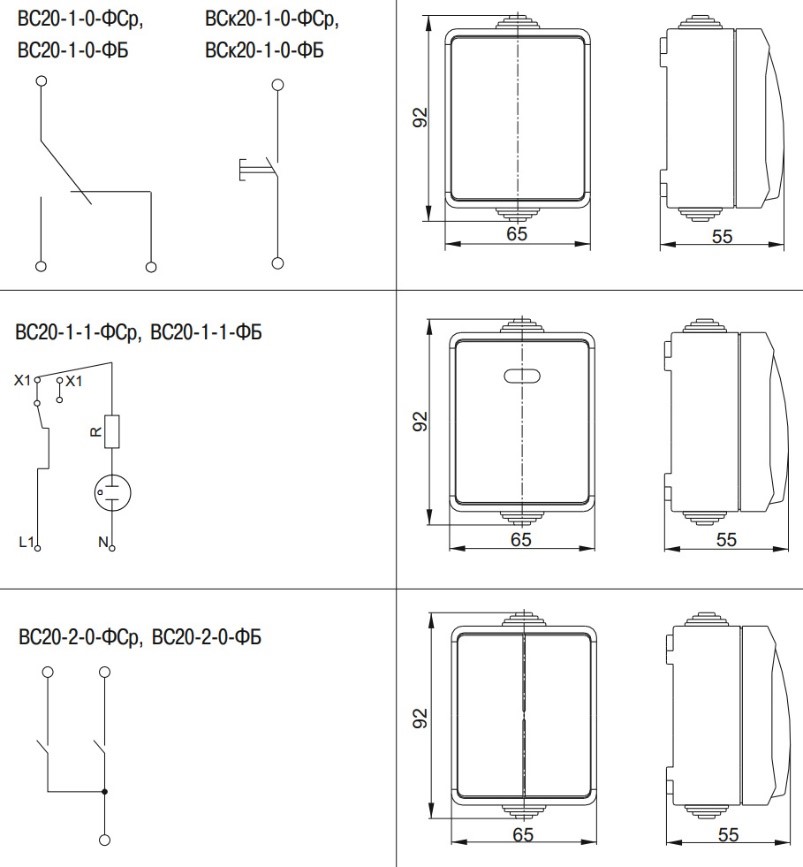
Connection diagrams for FORS switches.
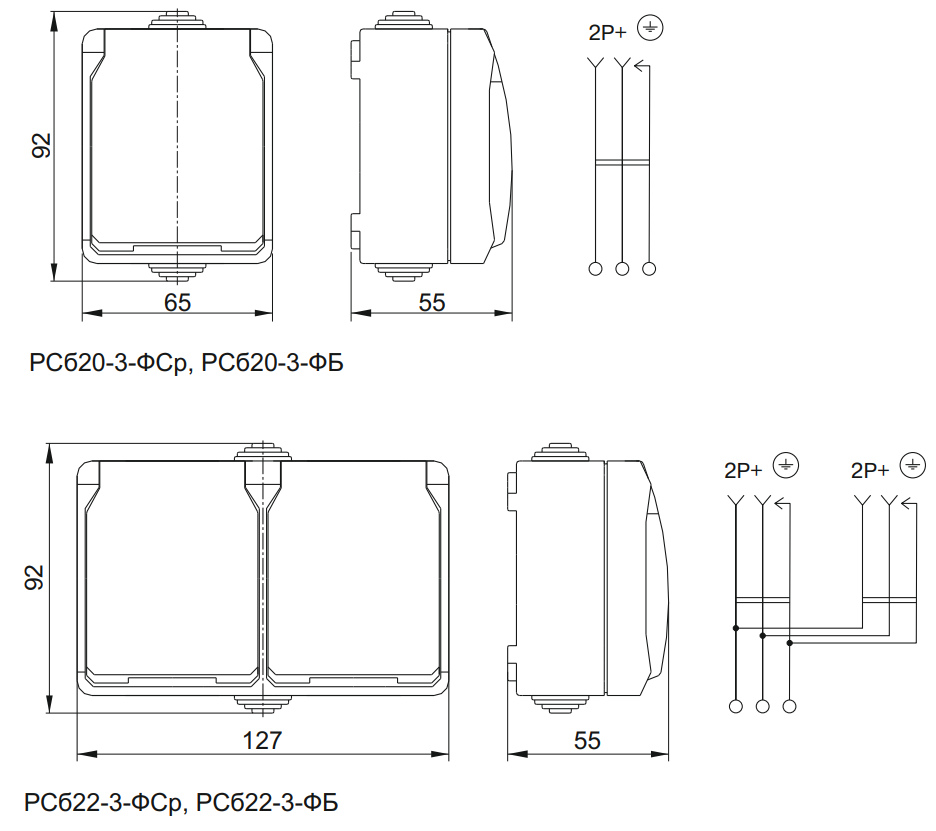
Connection diagrams for FORS sockets.
It is important to perform installation on a flat surface, otherwise housing misalignment is possible. This can lead to deterioration of sealing and even damage to the socket or switch design.
Inside FORS socket and switch housings, there is ample space for placing wiring. Thanks to this, in many cases, it is possible to refuse using junction (distribution) boxes, since the necessary connections can be made directly inside the wiring accessory housing.
Supply cable routing is usually done on the surface: in corrugated or smooth pipe, cable duct, metal trays, or without protection. This helps monitor the condition of the electrical wiring, and in case of damage – easily replace it.
How to maintain IP54 protection degree?
We remind you that with open installation of sockets, under conditions of possible splashes, the danger of electric shock becomes quite high. Therefore, to protect people, not only covers and shutters in sockets are needed – it is mandatory to use RCDs. This is stated in various regulatory and technical documents: in PUE-7 (clause 1.7.151), in SP 256.1325800.2016 (clause A.5.4), as well as in GOST R
In addition, it is important to use quality electrical cable appropriate for the load and installation conditions. Screw-type terminal clamps allow connecting conductors with a cross-section of
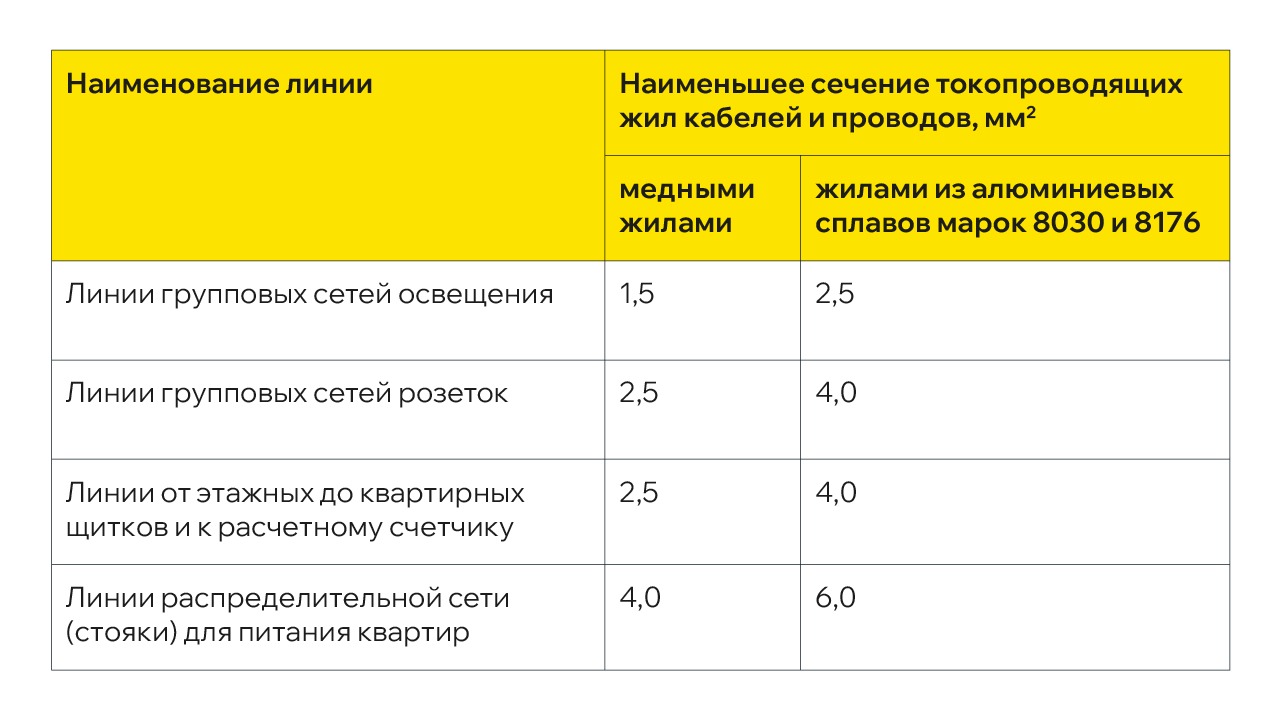
SP 256.1325800.2016. Table 15.3
During installation, it is very important to correctly cut and install the stepped cable glands for sealing the product. Cable glands are one of the factors that ensure IP54 protection for FORS wiring accessories.
Important! If you run the cable above the socket or switch, you cannot insert a corrugated or smooth pipe into the cable gland, as the IP54 protection degree will not be maintained. The corrugated pipe is ribbed and will not provide tight cable fit to the gland. And inside a smooth pipe, condensation can form at negative ambient temperatures. If the cable is located above the socket, moisture from the pipe walls will drain onto the socket/switch contact group, which will lead to a short circuit. Therefore, in this case, only the cable itself with a round cross-section can be inserted into the cable gland.
If the cable is run below the socket/switch, it is allowed to mount a smooth or corrugated pipe into the cable gland.
FORS wiring accessories are already on sale! Find reliable sockets and switches on our website and from official IEK GROUP dealers.